
You can still generate ideas, but the download counter is running low. Your next project needs six songs, alternate versions and stems for mixing. Suno V6 download limits are easier to plan around when you count song candidates separately from generation credits and delivery files.
This guide explains the current counters, shows a worked six-track budget and provides a handoff checklist. It covers the September download policy alongside V6 because creators encounter both in the same workflow. The policy change and model launch are separate events.
Ready to release your Suno music? Make your shortlisted downloads work toward a release and a direct sale to your fans. Start with Undetectr’s watermark-removal workflow, then sell your AI music direct to your fans on Played.fm.
Plan generation credits, song downloads and delivery files as separate counts.
Key takeaways
- Generation credits and download allowances answer different questions. Having one available does not establish the balance of the other.
- The documented library allowances are 20 monthly downloads on Pro and 60 on Premier; free trials are limited and non-commercial.
- Suno counts the song for its stated allowance, rather than treating each format or stem as another song.
- Studio has separately documented export workflows. Verify which route you are using and which controls your account offers.
- Plan candidates first, then delivery formats. Reopen the final files before promising a handoff.
In this guide
- Why the download questions keep recurring
- Separate generation credits from download allowances
- What are the Suno V6 download limits?
- Do stems and different formats count again?
- Build a six-track download budget
- Choose the right Studio export for the handoff
- What to do when the counter or download looks wrong
- Finish with a deliverable file set
- How to release Suno music: watermark removal with Undetectr
- Sell your AI music direct to your fans on Played.fm
- Frequently asked questions
Why the download questions keep recurring
A September 4 r/SunoAI question asks whether a song with eight stems consumes one download or eight. A separate September 3 discussion asks whether Studio exports reduce the Premier library allowance. These are clear practical questions, regardless of how someone feels about V6's sound.
They also reveal a terminology problem. People may use “credits” for generating, downloading or a particular editing operation. “A song” might mean a composition, one generated candidate or a finished delivery package. A useful answer needs to say which of these it counts.
The official help pages are the authority for policy. Community threads show where the wording is confusing, but individual account reports do not establish a rule for every subscriber. Dates matter too: an August prediction about the change is not the same as the current September documentation.
Our approach is to separate those questions and turn them into a project worksheet. If you only need to choose an audio format, use our Suno export settings guide. This article concerns planning the allowance and the files that follow.
Separate generation credits from download allowances
Think about three stages: making candidates, obtaining local source files and assembling a finished handoff. Each stage can produce a different count.
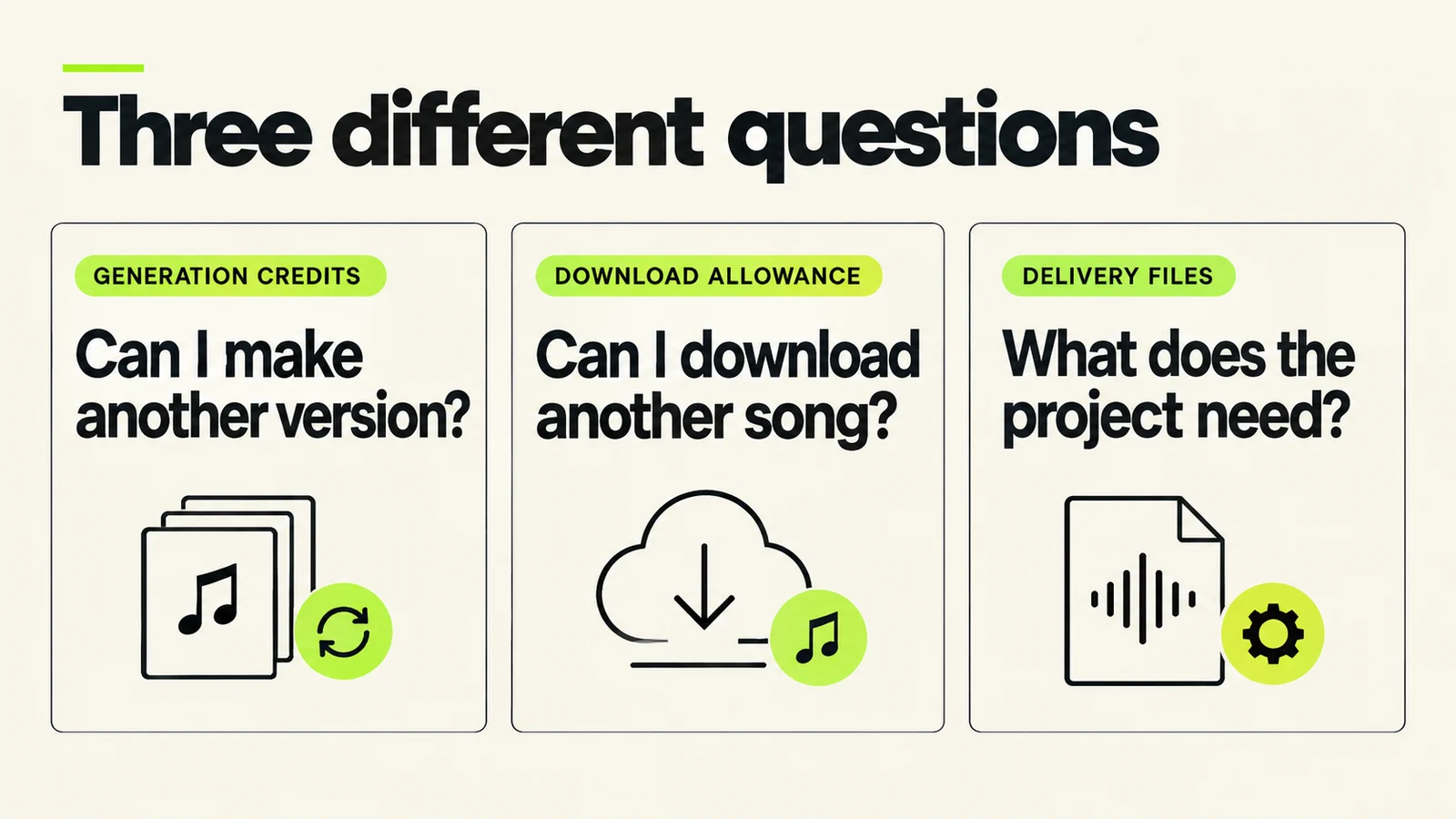
Keep the counters separate in your notes. A folder containing several files can still represent one song.
| Stage | What you are deciding | What to record |
|---|---|---|
| Generation | Whether to make another candidate | Operation, model and displayed credit cost |
| Download | Which song candidates need local files | Song identity, current allowance and route |
| Delivery | What the recipient needs | Mix, stems, excerpts and documented versions |
The V6 FAQ states that a standard generation creates two songs for 10 credits; more complex media inputs can cost more, and Max Mode costs extra. Use the displayed cost for the operation you are actually about to run.
For an illustrative calculation, four standard generation requests would produce eight candidate songs and use 40 generation credits under that stated rate. That calculation does not tell you how many candidates you should download. If only two are useful, your local audition shortlist can be smaller than the set you generated.
Write the task before spending: “I need an alternative chorus delivery” is a reason for another candidate. “I have credits left” is only a balance. The prompt comparison workflow helps you make each experiment answer a question.
A file count is not a song count
A delivery folder might contain a stereo mix, an instrumental version prepared in your editor, several stems and a listening copy. Count those as deliverables for the recipient. Separately track which Suno song or songs supplied the material.
Two different generated takes of the same lyric should remain separate rows in your planning sheet. Do not assume that sharing a title makes them one item for allowance purposes. Identify each candidate by its actual song link or visible identifier, and check the account's download prompt if anything is unclear.
What are the Suno V6 download limits?
As checked September 11, Suno's subscription allowance page lists these library-download allowances:
| Plan | Stated allowance |
|---|---|
| Free | Up to seven lifetime trial downloads |
| Pro | 20 downloads per month |
| Premier | 60 downloads per month |
Paid monthly allowances reset on the billing date and do not accumulate. Suno says Studio workflows are unaffected by these limits. Check the balance in your own account before applying the table to a project already in progress.
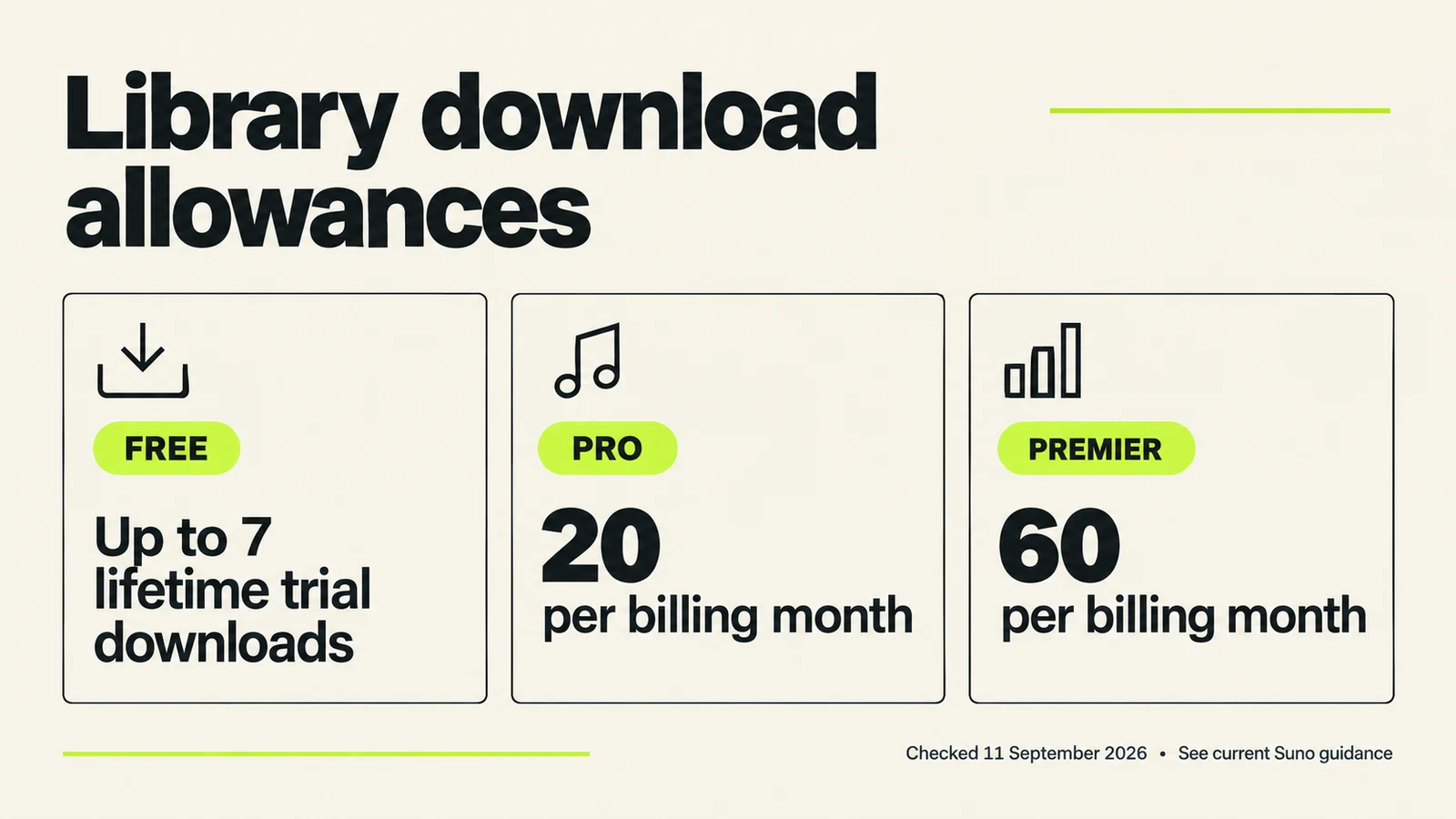
Policy snapshot, not pricing. Free trial eligibility and commercial-use restrictions need the qualifications below.
Monthly allocations and purchased packs differ
Suno's rollover guide distinguishes the subscription allocation from purchased downloads: monthly allocations expire, while individual purchases and packs carry over. An annual subscription still receives its allocation monthly, following the original purchase date.
Put the reset date on the project sheet. If the deadline falls before it, next month's allowance is not part of the available budget. If there is no deadline, you can decide which archival work belongs in a later period rather than rushing every candidate through now.
Free-account wording needs care
The September 9 free-trial page says free accounts include up to seven lifetime trial downloads for personal, non-commercial use. An older September 3 overview distinguishes accounts created before that date from later accounts that may receive trials occasionally.
Because the wording differs, check the trial balance actually offered to your account. Do not plan a commercial delivery on the assumption that “up to seven” guarantees seven immediately available downloads. A downloaded file and permission to sell it are separate questions.
Do stems and different formats count again?
Suno's current allowance guidance says re-downloading the same song, taking another format and downloading that song's stems do not each consume another allowance. Failed or interrupted downloads do not count either.
The practical distinction is one song represented by several files versus several separate song candidates. Keep the identities clear when naming downloads, particularly when several versions share the same title.
A stem download is also not proof that a usable mix is finished. Open the parts and check what they contain. If you plan to hand them to another producer, ask what that person needs: complete aligned files, selected parts, a reference mix or another agreed package.
The answer may save work. A collaborator who only needs the vocal and a reference mix may not need every alternate export. Someone mixing from scratch may need a much fuller handoff. Define that requirement before creating a folder of unexplained files.
Build a six-track download budget
Here is an original planning example. Assume you have 20 library downloads available at the start of the exercise. You are preparing six tracks and want two distinct candidates for each, plus three separate cue candidates for related video work.
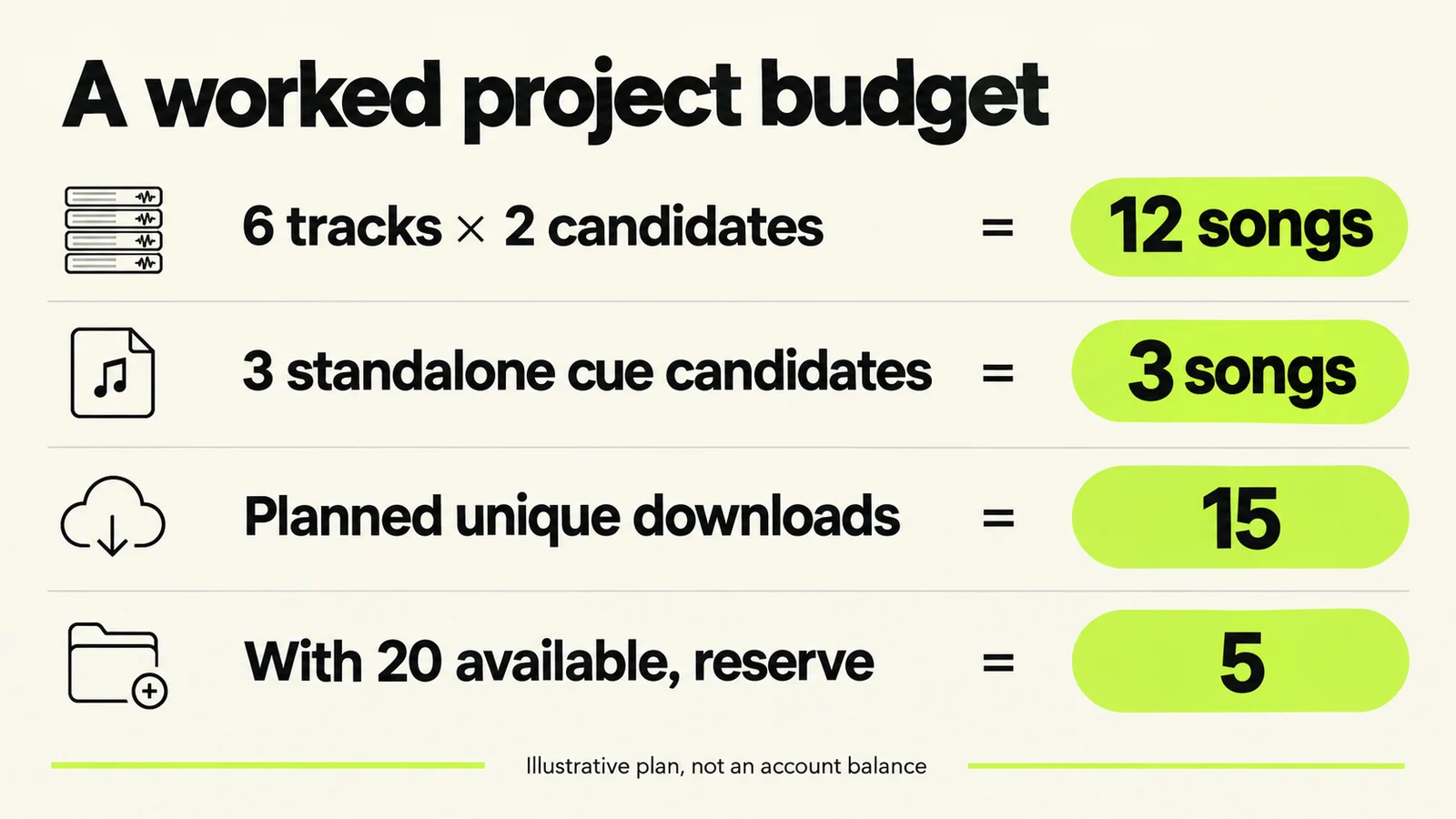
Illustrative arithmetic. Replace the starting balance and candidate counts with your own values.
| Planned material | Unique candidates to obtain |
|---|---|
| Six tracks, two candidates each | 12 |
| Three separately generated cue candidates | 3 |
| Total planned unique downloads | 15 |
| Reserve from an assumed balance of 20 | 5 |
This is a planning estimate, not a reconstruction of Suno's billing system. The reserve leaves room for revisions you cannot yet specify. It is not a recommended minimum for every project.
Step 1: List the actual jobs
Give each song a purpose. A finished single, a private demo and a narration bed have different acceptance criteria. Write the expected delivery date and the person who will decide whether the material works.
For each track, name a first candidate and one genuine alternative. If you cannot explain what the alternative tests, consider leaving that slot unallocated until you hear the first candidate more carefully.
Step 2: Audition before exporting everything
Listen for problems that would make a candidate unusable: the wrong lyric, a weak hook, an abrupt ending or a change of voice you do not want. Note promising candidates instead of treating every generation as something that needs a local archive immediately.
Archiving can be a legitimate project in its own right. If that is your goal, list it separately from this month's production deliveries. Mixing “save my entire history” with “finish six tracks” hides the resource each job needs.
Step 3: Keep a small candidate ledger
Use a note or spreadsheet with these columns:
Track:
Candidate ID or link:
Purpose:
Already local?:
Required files:
Download route:
Decision:
Delivery filename:
Mark a candidate as local only after its file opens successfully. Mark it as accepted only after it passes the listening check. Those are different milestones, and separating them prevents an incomplete download from being mistaken for a finished master.
Step 4: Recalculate when scope changes
If the project expands from six tracks to eight, update the estimate before generating another large batch. If three cues can instead be edited from a recording you already possess and are entitled to use, revise the delivery plan accordingly.
When the budget no longer fits, your choices include reducing alternatives, scheduling work after the reset, using a documented route available to your plan or considering an additional purchase after checking its current terms. The worksheet should clarify the decision; it should not push you toward an upgrade by default.
Choose the right Studio export for the handoff
The September Studio export guide lists full-song, selected-range, multitrack and clip exports. Suno's downloads overview distinguishes Studio workflows from the library allowances. Confirm the route shown in your account when budgeting a project.
For file formats, alignment and delivery checks, use Suno export settings. For editable note data, follow Suno MIDI export; Get MIDI is a separate operation with a currently documented 10-credit charge. Keeping these jobs separate prevents a download allowance from being mistaken for an all-purpose production budget.
What to do when the counter or download looks wrong
Start by describing the discrepancy accurately. “I cannot download” could mean an exhausted allowance, a missing format, a stalled transfer, an account permission issue or a file that downloaded but will not open.
Record the song identity, export route, time, displayed message and balance before and after the attempt. Keep account screenshots private when they contain billing or personal information. If the result differs from the current help text, send the details through Suno's official support route.
Avoid repeatedly generating replacements for a download problem. A new song does not diagnose why the first file failed to arrive. Likewise, processing a damaged or incomplete transfer is not a substitute for obtaining the correct source.
For older downloads, check the status shown in your account instead of inferring it from a file on your disk. A local filename does not explain how the service has recorded an earlier action. Preserve the file you have while resolving any account-specific discrepancy.
Finish with a deliverable file set
The project is ready for handoff when someone can identify and use the intended files. A folder containing everything you ever tried leaves the recipient to make decisions you should already have made.
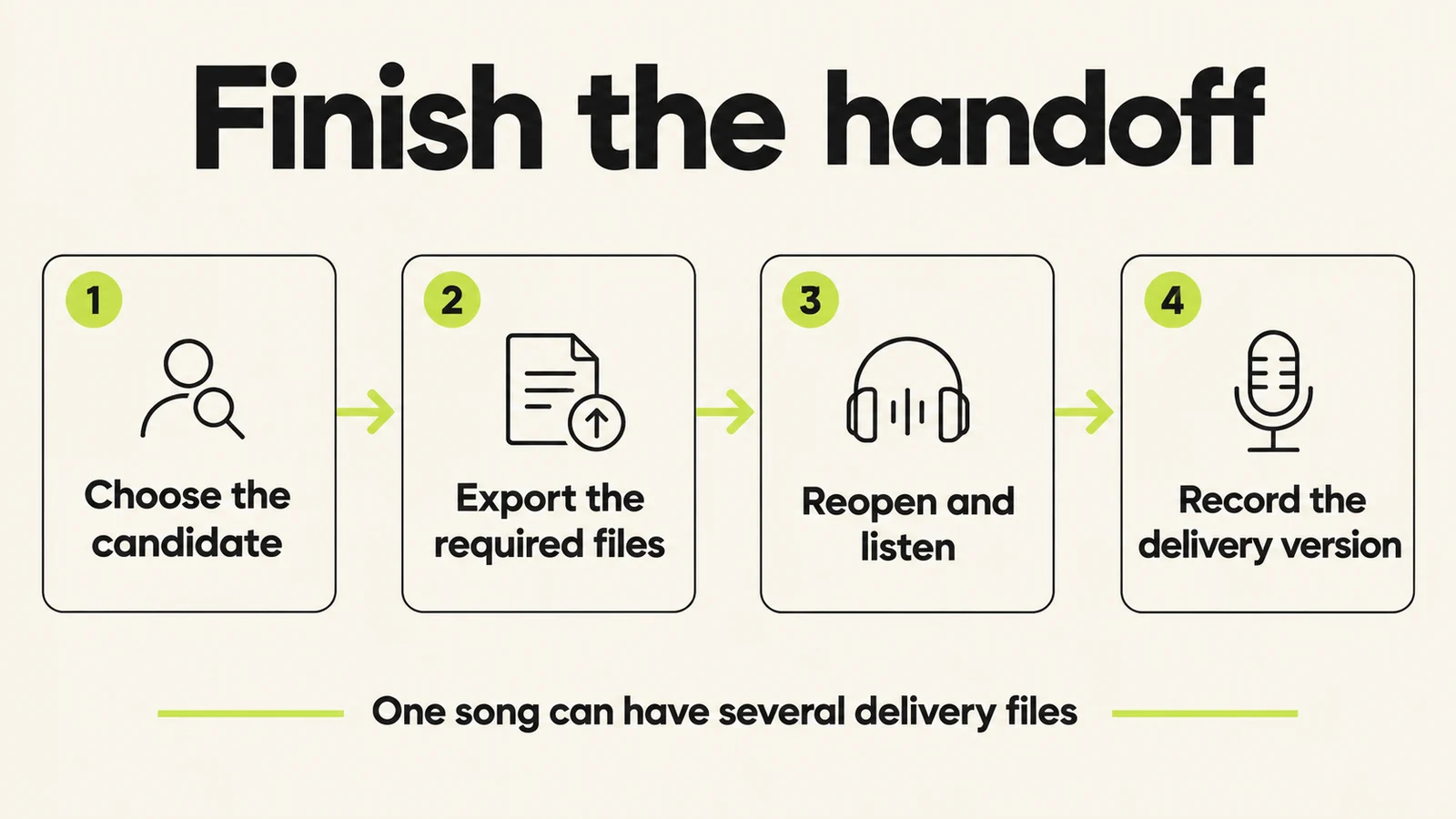
Verify the files, not just the successful download message.
Include an accepted reference mix, the requested production files and a short note explaining version names. State whether an excerpt is a draft or the approved cut. Keep rejected candidates elsewhere so they do not become accidental delivery files.
Open the package from its intended storage or transfer location. Check that the audio is complete and the recipient has any required access. For multitrack work, confirm the agreed alignment and naming conventions before declaring the package ready.
If the accepted recording still has an audible problem, use the artifact workflow or consider Undetectr as an audio-processing option. Compare any processed version with the original and identify it clearly in the handoff. Processing is a production decision, separate from download accounting.
Finally, check the release preparation guide for destination requirements and documentation. Obtaining a file completes one stage; the finished recording and its intended use still need their own review.
How to release Suno music: watermark removal with Undetectr
Start the watermark-removal stage with Undetectr.com. Its tools are offered for AI-audio watermark and artifact removal. Use the accepted local mix from your candidate ledger. Save the processed result with a distinct filename so it cannot be confused with a rejected take.
- Upload a copy of your chosen Suno export to Undetectr.
- Run the processing and download the result.
- Listen through the complete file, then prepare the version for your chosen release destination.
Sell your AI music direct to your fans on Played.fm
Sell your AI music direct to your fans on Played.fm. Create a storefront, set your offer and give listeners a purchase destination you can share alongside your music.
Turn the six-track package into one clearly described offer. List the included tracks and formats, prepare the preview and confirm the purchase-to-delivery path before sharing it.
Start with one finished release. Add the cover, credits and delivery details, then share the storefront link with the listeners who already connect with your music.
Frequently asked questions
Are generation credits and downloads the same balance?
No. Keep separate records for creating candidates and obtaining local song files. The remaining amount in one category does not tell you what is available in the other.
Do eight stems use eight download allowances?
For one song, Suno's current guidance bundles the stems with that song's download. Keep separate generated candidates distinct when planning your total.
Should I download every generated version?
Decide whether you are archiving or producing a current project. For production, shortlist candidates against a clear musical purpose; for archiving, plan the collection as its own task.
Does an annual plan provide a year's downloads at once?
Suno's rollover guidance describes monthly top-ups for annual plans. Plan around the actual next allocation date shown for your subscription.
Are purchased packs treated like the monthly allocation?
The linked rollover guide distinguishes them: purchased downloads carry over, while the recurring allocation does not. Check current purchase terms before making a spending decision.
Is a Studio export the same as a library download?
They are separately documented workflows. Identify the route you are using and consult the corresponding guidance rather than assuming every download button has identical accounting.
Can I sell a track obtained through a free trial download?
Suno says trial downloads are for personal, non-commercial use and do not grant commercial rights. Check the terms applicable to the actual song and intended use before listing it for sale.
What should I check immediately after downloading?
Open the file, confirm the candidate and listen through the beginning and ending. Before delivery, check the entire recording and record its exact filename in the project notes.
About this guide
Prepared September 11, 2026 by Ines Halvorsen using last30days research for August 12–September 11 and current official help pages. Community questions establish a practical information need, not measured keyword volume. The six-track budget is original illustrative arithmetic, not observed account behavior. Policies and account balances can change; use the linked guidance and your account's displayed information. See our research methodology.